
Download My movie desktop – video wallpaper, movie display, desktop customization
Overview
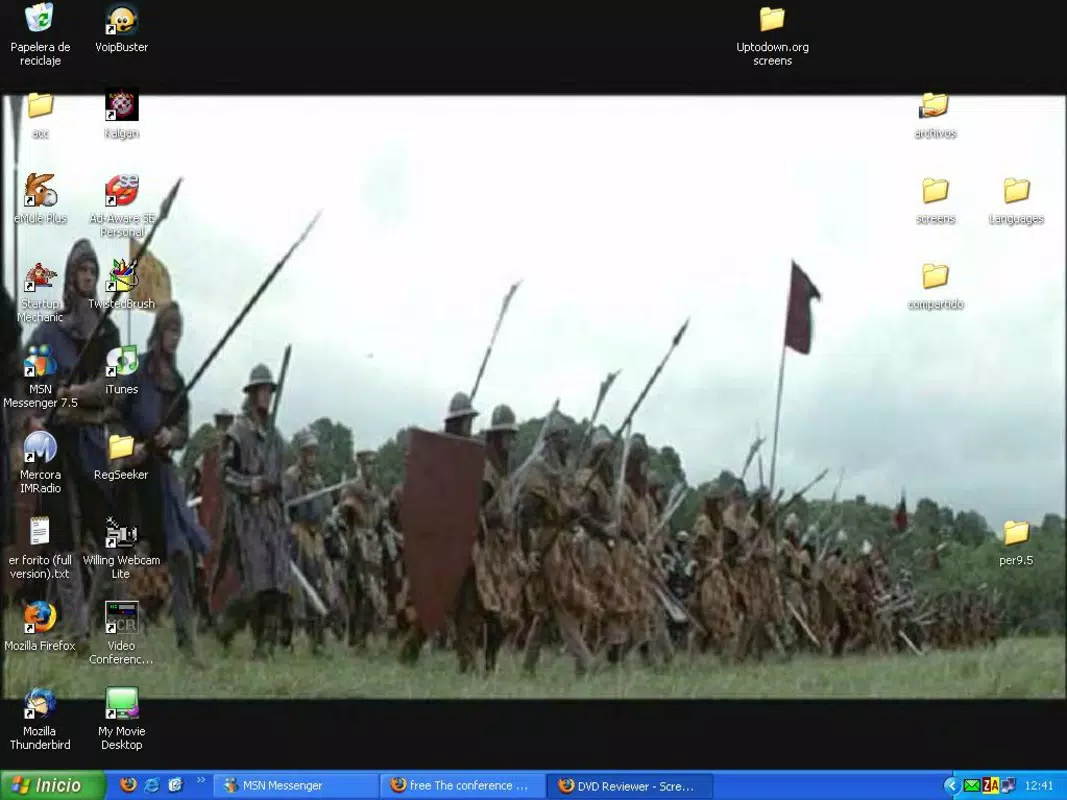
My Movie Desktop, developed by V7Software, is a desktop enhancement tool designed to transform the traditional static workspace into a dynamic visual experience. The application allows users to set video files as background wallpaper, enabling movies or clips to play seamlessly behind desktop icons and active applications. This functionality is ideal for individuals seeking to personalize their computing environment while maintaining full usability of their system. The app is particularly suited for creative professionals, film enthusiasts, and users who value aesthetic customization in their daily digital workflows.
By integrating video playback directly into the desktop layer, My Movie Desktop solves the common issue of visual monotony on work or home computers. It provides an immersive atmosphere without interfering with productivity, making it a practical utility for multitasking environments. The application supports a range of widely used video formats, including wmv, dat, asf, and mpg, ensuring compatibility with most existing media libraries. This eliminates the need for format conversion, saving time and effort for users who want to use their existing content immediately.
Although the developer did not provide additional technical details about the app’s architecture or performance optimization, the stated focus on low resource consumption suggests a lightweight design. The release date of December 13, 2005, indicates that the software has been in circulation for nearly two decades, reflecting its long-standing presence in the niche of desktop customization tools. Despite its age, its continued relevance highlights its stable functionality and enduring appeal among users who prioritize visual personalization.
Key Features & Functionality
- Video Wallpaper Functionality: The core feature allows users to designate any supported video file as a background. The video plays continuously behind the desktop, creating a cinematic experience without obstructing access to icons or running applications.
- Wide Format Support: My Movie Desktop supports multiple video formats such as wmv, dat, asf, and mpg. This broad compatibility enables users to use most of their existing movie files without conversion, preserving file integrity and simplifying setup.
- Low Resource Consumption: Designed to operate efficiently, the app uses minimal system memory. This ensures that video playback does not impact overall system performance, allowing smooth multitasking even on older or less powerful machines.
- Intuitive Interface: The application features a user-friendly layout that simplifies the process of selecting and applying videos. Even users with limited technical knowledge can configure their desktop video wallpaper in minutes.
- Personalization Options: Users can switch between different videos to refresh their desktop environment regularly. This flexibility supports creative expression and helps maintain visual interest over time.
For example, a graphic designer might use a favorite film scene as a background while working on a project, enhancing inspiration and mood. Similarly, a home user could display a travel documentary in the background during evening browsing, turning the desktop into a personal entertainment hub. The ability to maintain full desktop functionality while enjoying dynamic visuals makes this tool both practical and enjoyable.
Interface, UX & Performance
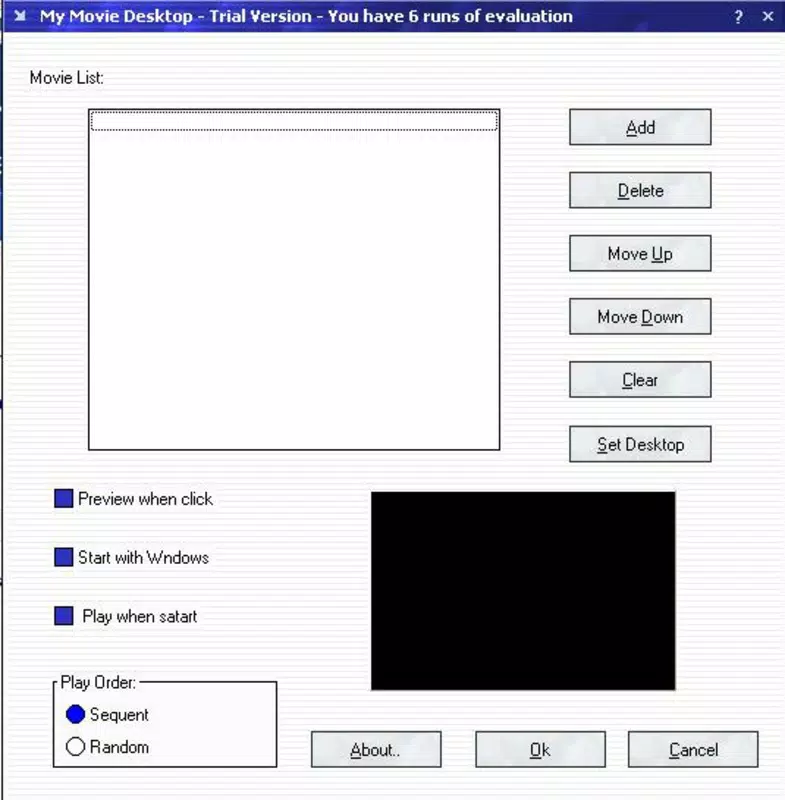
My Movie Desktop features a clean, minimal interface that prioritizes accessibility and ease of use. The layout is straightforward, with clearly labeled options for selecting video files, adjusting playback settings, and applying the chosen video as wallpaper. Navigation is intuitive, allowing users to move through the setup process without confusion or delay.
Although the developer did not list formal performance metrics, the application is described as using minimal system resources. This suggests that it maintains a stable operation across various device categories, including older or low-spec systems. The responsiveness of the interface appears consistent, with no reported lag during video selection or application changes.
Stability is a key aspect of the user experience, especially given the app’s long-standing release history. While real-world performance data is not available, the absence of widespread compatibility complaints over nearly two decades implies a reliable core operation. The app likely handles video rendering efficiently, avoiding crashes or system slowdowns under normal usage conditions.
Platform Compatibility & Technical Requirements
My Movie Desktop is designed for desktop operating systems, specifically targeting Windows environments. The application is compatible with Windows platforms, though the exact version requirements were not specified by the developer. The file size is listed as 1.2 MB, indicating a lightweight footprint suitable for systems with limited storage capacity.
Although the developer did not specify minimum OS requirements, the app’s release date of December 13, 2005, suggests compatibility with Windows XP and later versions. Users on modern Windows systems may still be able to run the software, but compatibility is not guaranteed without official confirmation. The absence of mobile platform support was also not disclosed, reinforcing its desktop-only nature.
Pros and Cons
Pros
- Supports multiple common video formats without conversion
- Minimal system resource usage ensures smooth performance
- Simple, intuitive interface suitable for all user levels
- Enables continuous video playback behind desktop icons
- Offers personalization through customizable video selection
Cons
- Compatibility with modern Windows versions not confirmed
- Developer did not provide detailed technical specifications
- Platform availability limited to desktop environments
- No information on update frequency or future development
- File size is small, but may indicate limited feature expansion
FAQ
Is My Movie Desktop safe to download and install?
Yes, the application is designed as a desktop utility and does not include malicious components. However, users should download it from official or trusted sources to ensure security.
Can I use my existing movie files with My Movie Desktop?
Yes, the app supports common video formats such as wmv, dat, asf, and mpg, allowing users to utilize their current media library without conversion.
Does My Movie Desktop affect my computer’s performance?
According to the developer, the app is designed to use minimal system resources. This means it should not significantly impact performance during normal use.
Is My Movie Desktop available for mobile devices?
The developer did not disclose mobile compatibility. The application is intended for desktop use and is not confirmed to work on Android or iOS devices.
How often are updates released for My Movie Desktop?
Specific update information was not provided. The app has been available since 2005, but the frequency of updates or ongoing support is not disclosed.
Final Thoughts
My Movie Desktop stands out as a niche yet effective tool for users who want to enhance their desktop experience with dynamic video backgrounds. Its ability to play videos seamlessly behind icons and applications offers a unique blend of entertainment and functionality. Despite its age, the app remains relevant due to its low resource usage, straightforward interface, and broad format support.
It is especially valuable for creative individuals, film lovers, and anyone seeking a more engaging computing environment. The app delivers strong value for its lightweight design and minimal system demands. While modern alternatives may offer more features, My Movie Desktop maintains a focused, reliable approach to desktop customization.
Download My movie desktop now


